
How to Choose an AI Server? The Complete 2026 Hardware Configuration Guide for Training and Inference
Introduction: Why AI Server Selection Became a Required Course in 2026
The structure of AI compute spending is changing fundamentally. An analysis released by McKinsey in February 2026 projects that by 2030, inference will overtake training as the dominant workload in AI data centers, accounting for more than half of all AI compute and roughly 30%–40% of total data center demand. For enterprises, the logic of server procurement is shifting from "stacking GPUs for training" to "running inference with disciplined cost control" — choose the wrong configuration, and the cost is not a one-time overpayment, but three years of paying electricity bills and rent for the wrong architecture, every single day.
At the same time, GPU product cycles have clearly accelerated: before the H200's 141GB of VRAM has even had time to settle in, the B200's 192GB and the B300's 288GB are already rolling out, while the RTX PRO 6000 is carving out the mid-range inference market with 96GB of VRAM and a PCIe form factor. More models paradoxically make selection harder. This article uses one decision axis and two comparison tables to make 2026 AI server selection clear.
What Exactly Is the Difference Between a Training Server and an Inference Server?
Quick answer: training is a compute-intensive, one-time mega-project; inference is a VRAM-and-bandwidth-intensive continuous service. Training servers pursue peak multi-GPU interconnected compute (full NVLink/NVSwitch fabric, high power density, liquid cooling); inference servers pursue stable throughput per unit cost (VRAM that fits the model, bandwidth that streams tokens, manageable per-GPU power, and 7×24 reliability).
In hardware terms, training clusters favor 8-GPU SXM systems with InfiniBand networking; inference deployments enjoy a much wider range of options — single-GPU RTX PRO 6000 workstations, 2U/4U multi-GPU servers, and even compact inference nodes at the edge. The reality of 2026 is that the vast majority of enterprise AI budgets go to inference, so server selection should follow "inference-first, training on demand."
Why Does VRAM Matter More Than Compute When Choosing an AI Server?
Quick answer: if the model does not fit in VRAM, even the highest TFLOPS count is zero. Whether a model can run depends on how much VRAM its weights + KV Cache + context length occupy; only after it fits do bandwidth, FP4/FP8 support, and price become meaningful points of comparison.
Rule of thumb (2026): at FP16 precision, a 70B model requires about 140GB of VRAM — a single H200 (141GB) fits it exactly, otherwise you need two H100s; FP8 quantization halves the requirement; FP4 halves it again, but only the Blackwell architecture (B200/B300/RTX PRO 6000) supports FP4 natively. Every doubling of the context window grows KV Cache usage almost linearly — which is why between "it fits" and "it serves well" there is still bandwidth: the H200 delivers 4.8 TB/s, while the B200/B300 deliver 8 TB/s.
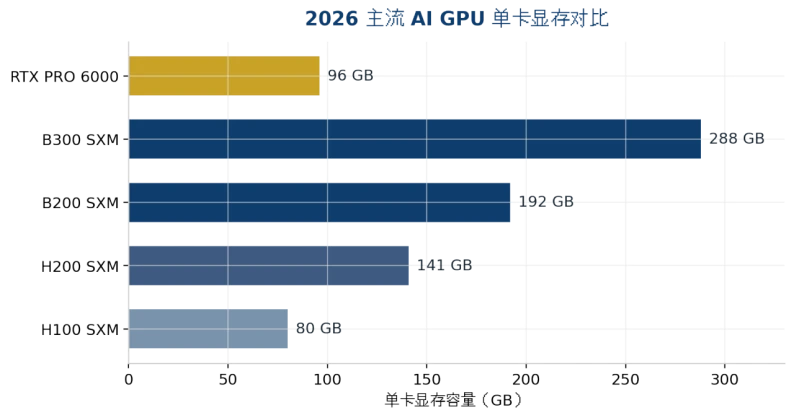
Figure 1: Single-GPU VRAM Comparison of Mainstream AI GPUs in 2026 (data sources in the appendix)
How to Choose Among Mainstream GPUs in 2026: H200 vs B200 vs B300 vs RTX PRO 6000
Quick answer: for models within 141GB, the H200 offers the best value; choose the B200 when you need FP4 or more VRAM; choose the B300 when a single GPU must hold a 200GB+ model or KV Cache pressure is high; choose the RTX PRO 6000 for mid-range inference and PCIe environments.
Dimension | H200 SXM | B200 SXM | B300 SXM | RTX PRO 6000 |
Architecture | Hopper | Blackwell | Blackwell Ultra | Blackwell |
VRAM | 141GB HBM3e | 192GB HBM3e | 288GB HBM3e | 96GB GDDR7 |
Memory Bandwidth | 4.8 TB/s | 8 TB/s | 8 TB/s | ~1.8 TB/s |
FP4 Compute | Not supported | 9 PFLOPS | 15 PFLOPS | Supported (single-GPU class) |
TDP / Cooling | 700W / air cooling viable | 1000W / liquid cooling recommended | ~1400W / liquid cooling essentially required | 600W / air cooling |
Typical Positioning | 70B–100B inference, fine-tuning | 100B+ inference, training | Single-node hosting of frontier LLMs | Mid-range inference, workstation/edge |
2026 Cloud Rental Reference | ~$4.4/GPU·hr | ~$5–7/GPU·hr | ~$7.4–8.3/GPU·hr | Primarily full-system purchase |
Table 1: Key Specifications and Positioning of Mainstream AI GPUs in 2026 (prices are August 2026 market references and highly volatile — request a fresh quote before purchasing)
Two trends are easily overlooked: first, the median cloud rental price of the H200 has risen about 25% since August 2025, the Hopper–Blackwell price gap is narrowing, and the window for "saving money with last-gen cards" is closing; second, the RTX PRO 6000 now comes in a 400W Server Edition, allowing more GPUs within the same power budget — friendlier for inference providers who bill per token.
How Big Is the Model, and How Much Machine Does It Need?
Quick answer: estimate the VRAM floor as "model weights × 1.2 (KV Cache headroom)", then use the table below to determine the GPU count; models that exceed a single node move to multi-node parallelism, where networking matters more than GPUs.
Target Model (2026) | Weight Size | Minimum Configuration | Recommended System Form |
7B–14B (Qwen/Phi class) | 15–30GB (FP16) | RTX PRO 6000 ×1 or 48GB workstation card | Tower/2U edge inference server |
32B–70B (FP8 quantized) | 40–80GB | RTX PRO 6000 ×1–2 or H200 ×1 | 2U/4U GPU server |
70B FP16 / long context | ~140GB+ | H200 ×1 (tight) or ×2 (safe) | 4U multi-GPU server |
DeepSeek V4 Flash (156GB) | ~156GB | B300 ×1 (~130GB headroom) | 4U liquid-cooled server |
GLM-5.2 FP8 (~756GB) | ~756GB | H200 ×8 or B300 ×4 | 8-GPU SXM system |
Kimi K3 (1.56TB MXFP4) | ~1.56TB | B300 ×8 (2.3TB total VRAM) | 8-GPU liquid-cooled flagship system |
Table 2: Model Size vs. Server Configuration (weights follow official checkpoint figures; actual deployments must add KV Cache and runtime overhead)
This table also explains why the 4U chassis is the "sweet spot" for AI servers: 8 dual-width GPUs, redundant power supplies, and sufficient cooling airflow — only a 4U enclosure can hold all three at once. 2U suits 2–4-GPU inference nodes, while 1U fits only a single GPU or serves as a front-end scheduling/storage node.
Air Cooling or Liquid Cooling? How to Decide Thermal and Rack Specifications?
Quick answer: below 700W per GPU, air cooling is sufficient; above 1000W per GPU — or beyond 20kW per rack — liquid cooling turns from a "nice-to-have" into a hard requirement. The B300's ~1400W TDP essentially locks in a liquid-cooling design.
The correct selection sequence is: fix the model and GPU first, then the total system power, and only then work backward to cooling and facility conditions. Many companies do it backwards — they buy the machines first, then discover that the power feed and air conditioning cannot keep up, and are forced to run throttled, which is like paying full price for a crippled GPU. Before purchasing, confirm three things: rack power feed (kW), intake air temperature and airflow, and headroom for the next 2–3 GPU generations (after the B300, TDPs will only go higher).
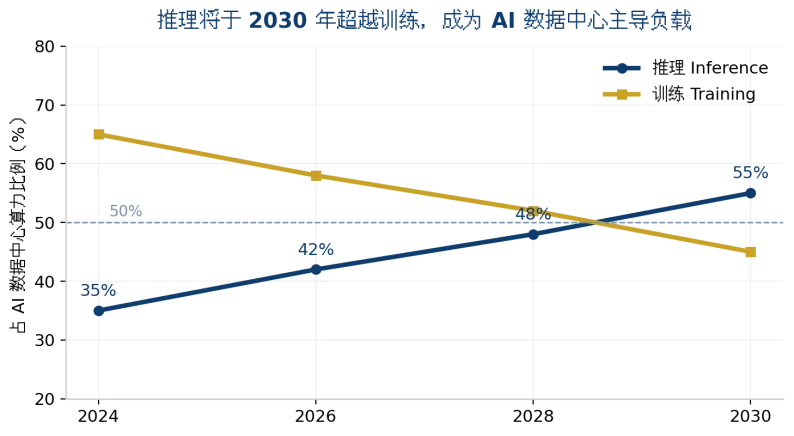
Figure 2: Inference Will Overtake Training as the Dominant AI Data Center Workload by 2030 (trend illustration; data sources in the appendix)
Cloud Rental or Self-Build? How to Run the Numbers?
Quick answer: below 60% utilization, rent from the cloud; for sustained high loads, build your own. At August 2026 market rates, H200 cloud rental runs about 4.4/GPU·hour — roughly38K for a full year at full load, which is close to the cost of buying one card outright. The higher the utilization, the faster self-build pays for itself.
The self-build ledger must add three more items: facility power and cooling operations (about 20%–30% of total cost of ownership), GPU generational depreciation (the H100 is already deeply discounted in 2026 — residual-value risk is real), and data compliance — for finance, healthcare, and government clients, data cannot leave the intranet, making private deployment not a choice but a mandate. Hybrid architecture is becoming mainstream: burst training in the cloud, resident inference on-premises.
ChangFan: GPU Servers and AI Hardware Built for the Inference Era
In the end, AI server selection is won not on spec sheets but on how well the configuration matches the scenario. Guangzhou ChangFan Intelligent Technology Co., Ltd. (ChangFan) offers rackmount GPU servers and AI inference systems across 1U/2U/4U form factors, with multi-GPU expansion, redundant power supplies and wide-temperature design. GPU count, VRAM configuration and air/liquid cooling can be customized to the target model size — delivering a stable and reliable hardware foundation for private LLM deployment, edge inference nodes and enterprise knowledge bases.
If you are evaluating the purchase and deployment of H200/B200/B300- or RTX PRO 6000-class GPU servers, you are welcome to contact ChangFan for configuration advice and complete-system proposals tailored to your target model (we sell hardware and build complete systems — we do not offer software subscription services).
Frequently Asked Questions (FAQ)
Q1: What is the minimum configuration to run a 70B LLM? A: At FP16 you need about 140GB of VRAM, so a single H200 is the most economical answer; after FP8 quantization, two RTX PRO 6000 cards (96GB×2) also handle the job at lower cost and with more deployment flexibility.
Q2: How is the B300 better than the B200, and is it worth waiting for? A: The B300 offers 50% more VRAM (288GB vs 192GB) and 1.5× the FP4 compute, but identical bandwidth and a TDP of about 1400W that requires liquid cooling. It is worth upgrading only when your model or KV Cache exceeds B200 node capacity.
Q3: What should an SMB buying its first AI server start with? A: Define the model you need to run first. For 7B–14B applications (customer service, knowledge bases, quality inspection), one 2U single-GPU inference server is enough to start; scale up to 4U multi-GPU once sustained high load is confirmed.
Q4: Is liquid cooling mandatory for AI servers? A: No. Below 700W per GPU with good facility conditions, air cooling is enough; liquid cooling is needed only above 1000W per GPU or in high-density multi-rack deployments. When selecting, leave headroom for the power trends of the next 2–3 GPU generations.
Q5: Cloud GPUs are so cheap — why buy your own server? A: Three reasons — above roughly 60% utilization, self-build costs less; sensitive data may not leave the intranet; and local inference has no network latency with a self-controlled SLA. Most enterprises ultimately adopt a hybrid "train in the cloud, infer locally" architecture.
