
How AI Is Changing Everyday Work: 2026 Productivity Tools, Job Restructuring and the New Skills List
Introduction: This Time, AI Doesn't Just Answer — It Starts Doing the Work
If you still think of AI as a “smarter search engine”, the 2026 data will reset that view: Stanford HAI's 2026 AI Index shows 88% of organizations already use AI in at least one business function; McKinsey estimates that 57% of US work hours are technically automatable — 44% via AI agents and 13% via robots.
How big is AI's impact on jobs, really?
Quick answer: not “wholesale replacement” but “structural ladder-pulling” — Goldman Sachs estimates the US is currently losing about 16,000 jobs net per month; the hiring ladder for entry-level roles is being pulled away, not the whole building collapsing.
Several key figures complete the real picture: 85% of enterprises will deploy at least one agentic AI system by mid-2026 (Gartner); administrative, data-entry, customer-service and legal-support roles face 75%–95% automation risk by 2027; data-entry and administrative jobs are expected to shrink by about 7.5 million. But the other side of the coin: World Economic Forum surveys show about two-thirds of employers plan to hire AI-skilled talent, and lower-skilled workers using AI tools raised productivity by 34%. What gets replaced is “tasks”; what gets amplified is “people who can use AI”.
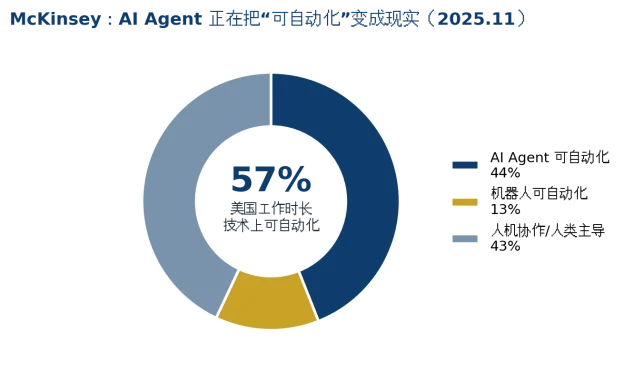
Figure 1: Structure of automatable US work hours (data sources in appendix)
How are AI agents different from earlier AI tools?
Quick answer: a chatbot outputs “content”; an agent completes “work” — it breaks down goals by itself, calls tools, executes multiple steps and delivers results. The highest enterprise adoption scenarios are customer-service automation (64%), supply-chain coordination (58%) and IT monitoring (53%).
The efficiency gap is an order of magnitude: benchmarks show an agentic tool finishes an itinerary-planning task in 9.2 minutes versus 38.5 minutes manually — a 76% saving; in multi-step workflows, AI can cut human effort by up to 86%. Deployment-side data is just as steep: multi-agent systems grew 327% in four months (Databricks); in customer-service automation, 82% of interactions are already completed autonomously. If your understanding of AI is still “write me an email”, you are already half a step behind.
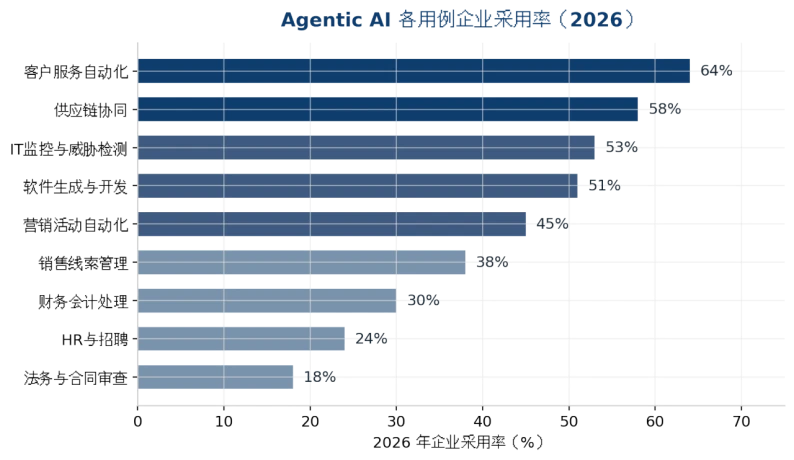
Figure 2: Enterprise adoption rates of agentic AI use cases (2026, data sources in appendix)
Which jobs are most at risk, and which are gaining value?
High-risk zone: repetitive, rule-based task roles — data entry, basic customer service, junior administration, templated copywriting, basic coding and basic legal review. What these roles share is “standardizable input and output” — exactly the sweet spot for agents.
Value-gaining zone: three kinds of capability are appreciating — cross-domain judgment (putting AI output into business context to make decisions), on-site capability (equipment installation and commissioning, production-line maintenance, client relationships and other physical-world work), and “the ability to manage agents” (breaking down goals, designing workflows, accepting deliverables). A formula worth remembering: your value = the part of you that cannot be replaced + the part you amplify by directing AI.
How can ordinary people build “irreplaceability in the AI era”?
▪Use AI as an “employee”, not a “tool”: learn to give an agent goals, set boundaries and accept deliverables, instead of just prompting line by line.
▪Go deep in one vertical domain: AI has leveled the “passing line”; domain expertise + AI is where the premium comes from — an engineer who knows the production line plus AI vision beats either one alone.
▪Build data-sovereignty awareness: sensitive corporate and personal data is increasingly processed locally; being able to set up a local AI assistant (private knowledge base, offline models) is becoming a résumé bonus.
▪Keep a “transferable learning speed”: Gartner expects 40% of enterprise applications to embed task-specific agents by the end of 2026; tools change every six months — the only thing that never depreciates is the speed at which you learn new tools.
What hardware does it take to run an AI assistant locally?
Quick answer: for personal 7B–14B models, a mini PC with an NPU or a host with 16GB+ RAM is enough to start; for a team-level private knowledge base (32B–70B), you need a GPU workstation with 48GB–96GB VRAM or a 2U inference server; data-sensitive industries should go straight to private deployment.
The software stack is already very approachable: Ollama pulls models with one command, OpenWebUI provides the chat interface, and vLLM handles team concurrency — no coding required. The real threshold is hardware: VRAM decides how large a model you can run, and stability decides whether it can hang in the office 7×24 as a “digital employee”. That is why more and more companies choose industrial-grade hardware for private AI: pay once, worry-free for three years.
ChangFan Industrial Computing: The Foundation of Your First “Private AI Digital Employee”
However AI changes work, it ultimately lands on a concrete machine running the model. Guangzhou ChangFan Intelligent Technology Co., Ltd. (ChangFan Industrial Computing / ChangFan) provides a full gradient of private AI hardware from individual to team: mini PCs and embedded industrial computers that run 7B–14B models, AI workstations supporting 48GB–96GB VRAM GPUs, and 2U/4U GPU servers for enterprise knowledge bases and multi-concurrent assistants — compatible with mainstream local inference stacks such as Ollama, vLLM and OpenWebUI, with data staying inside the corporate intranet end to end.
If you want to deploy a “data never leaves the intranet” AI assistant for your team, contact ChangFan Industrial Computing for a hardware solution customized to model size (complete hardware solution, no software subscription).
Frequently Asked Questions (FAQ)
Q1: Will AI make most people unemployed? A: the data shows structural restructuring rather than wholesale replacement: about 57% of US work hours are technically automatable, yet about two-thirds of employers are hiring AI-skilled talent at the same time. Jobs are disappearing and being born — the key is to stand on the side of “people who can use AI”.
Q2: What is the difference between an AI agent and chatbots like ChatGPT? A: a chatbot outputs content and needs you to prompt it step by step; an agent takes a goal, plans autonomously, calls tools, executes multiple steps and delivers results — for example, handling a full claims process automatically instead of just writing one email.
Q3: What should ordinary people learn first about AI? A: first learn to “get work done with agents” — give goals, set boundaries, accept results; then learn deep knowledge in one vertical domain. The combination is the best-value self-investment of 2026.
Q4: Why are more people deploying AI locally? A: three reasons — sensitive data never leaves the intranet (compliance), long-term cost below API subscriptions, and offline availability. Individuals start with a mini PC; teams use GPU servers; the software stack is ready out of the box.
Q5: What is the minimum configuration for a local AI assistant? A: a quantized 7B model needs about 8–16GB of RAM/VRAM, which mainstream mini PCs cover; a team knowledge base should use a complete GPU machine with 48GB+ VRAM, supporting multi-user concurrent access.
