
•RTX PRO 6000 Blackwell Workstation vs Max-Q vs Server Edition: Specs, Selection & 1/4/8-GPU Build Guide
1. The 30-Second Answer: One Table to See How to Choose
The NVIDIA RTX PRO 6000 Blackwell comes in three versions: the Workstation Edition, the Max-Q Workstation Edition, and the Server Edition. All three use the same GB202 die, the same 24,064 CUDA cores, and the same 96GB GDDR7 ECC memory — core AI and rendering capability is identical. The key to selection is not "which is faster," but power, cooling design, and deployment form factor.
Version | One-line positioning | Who it's for |
Workstation Edition (600W) | Single-GPU performance ceiling, dual-fan active cooling | Desktop single-GPU users: AI development, 8K rendering, simulation analysis |
Max-Q Workstation Edition (300W) | Half the power draw, blower rear exhaust, up to 4 GPUs per workstation | Office 2–4-GPU high-density workstations, multi-user sharing |
Server Edition (600W) | Passive cooling with no display outputs, designed for 7×24 rack operation | Data-center 4–8-GPU AI servers, inference clusters, virtual desktops |
Note: All three versions ship with 96GB GDDR7 ECC memory and a PCIe 5.0 x16 interface, with no NVLink. Prices fluctuate with GDDR7 supply; the budgets below are 2026 market estimates — please request a real-time quote for actual pricing.
2. Core Specs Comparison of the Three Versions
The table below summarizes the key specifications of the three versions. As you can see, the core compute (CUDA / Tensor / RT core counts, memory capacity) is identical across all three; the real differences concentrate in TDP power, cooling design, display outputs, and target deployment scenarios.
Specification | Workstation Edition | Max-Q Workstation Edition | Server Edition |
GPU Architecture | NVIDIA Blackwell (GB202) | Same as left | Same as left |
CUDA Cores | 24,064 | 24,064 | 24,064 |
Tensor / RT Cores | 752 (5th gen) / 188 (4th gen) | Same as left | Same as left |
Memory | 96GB GDDR7 ECC | 96GB GDDR7 ECC | 96GB GDDR7 ECC |
Memory Bandwidth | 1,792 GB/s | 1,792 GB/s | 1,597 GB/s |
FP32 Single Precision | 125 TFLOPS | 110 TFLOPS | ~117 TFLOPS |
AI Compute (FP4) | ~4,000 AI TOPS | 3,511 AI TOPS | ~3,800 AI TOPS |
Total Graphics Power (TDP) | 600W | 300W | 600W (configurable 400–600W on some platforms) |
Cooling | Dual-fan active (dual airflow channels) | Single-fan blower (rear exhaust) | Passive (relies on chassis airflow) |
Display Outputs | 4× DisplayPort 2.1 | 4× DisplayPort 2.1 | No display outputs |
Form Factor | Dual-slot, extended height 5.4"×12" | Dual-slot 4.4"×10.5" | Dual-slot 4.4"×10.5" |
MIG Multi-Instance | Supported | Supported (up to 4×24GB) | Supported (up to 4 instances) |
Recommended GPU Count | 1 GPU | 1–4 GPUs (workstation) | 4–8 GPUs (rack server) |
Sources: NVIDIA official specification pages and OEM channel datasheets. AI TOPS figures use the FP4 sparsity convention; labeling varies slightly across platforms.
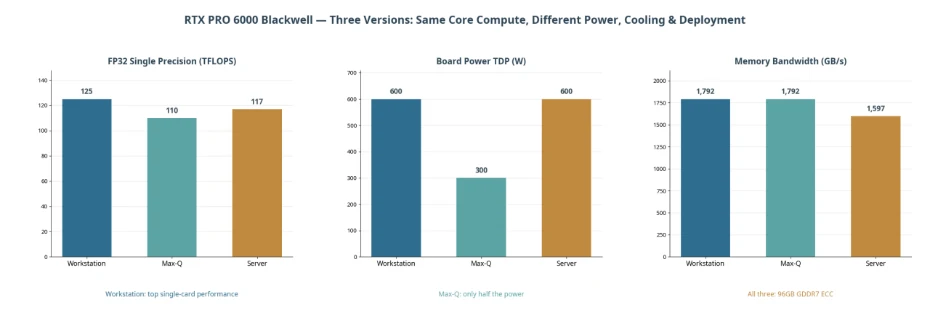
Figure 1 — Core metrics of the three versions: same compute, diverging power and form factors
3. The Differences in Detail: Same Compute — Different Power, Cooling, and Deployment Form
3.1 Workstation Edition: The Single-GPU Performance Ceiling
The Workstation Edition is the "full-power" form of the RTX PRO 6000 Blackwell: 600W power draw, 125 TFLOPS FP32, 1,792 GB/s memory bandwidth, dual-fan dual-channel active cooling — a single card unleashes the full performance and provides 4× DisplayPort 2.1 outputs. The trade-off is equally direct: 600W of heat is hard to accommodate in multi-card desktop setups — two 600W actively cooled cards in one chassis interfere with each other's airflow, and noise and temperatures become unacceptable. That is why the Workstation Edition is officially positioned for single-GPU use.
3.2 Max-Q Workstation Edition: The "Half-Power" Version Built for Multi-GPU
The Max-Q edition cuts TDP to 300W (exactly half) and uses a blower-style cooler that exhausts hot air straight out the rear of the chassis, so cards never "breathe" each other's exhaust — 2–4 cards can run stably in a single workstation, scaling to 384GB of VRAM per machine. In performance, FP32 retains about 88% of the full-power version, while AI inference workloads (especially large-model inference, which is bound by memory bandwidth rather than power) typically measure within about 10%. For multi-GPU workstation users, Max-Q is almost the only correct answer.
3.3 Server Edition: Designed for Racks and 7×24 Operation
The Server Edition has no fans and no display connectors; it relies entirely on the server chassis airflow for cooling. It supports dense 4–8-GPU deployment and MIG multi-instance partitioning (splitting one card into up to 4 isolated instances), with driver and validation support for data-center scenarios such as vGPU virtualization and shared inference clusters. Its memory bandwidth is slightly lower (1,597 GB/s), but the impact on the vast majority of AI workloads is minimal. Remember: the Server Edition cannot be installed in a regular tower workstation — without chassis airflow it cannot cool itself.
3.4 How Big Is the Performance Gap, Really?
Taking the Workstation Edition as the 100% baseline, third-party measurements put the Max-Q edition at roughly 90% on AI/ML workloads, 88% on content creation, and 85% on Blender rendering; the Server Edition comes in at roughly 85%/85%/80%. In other words: trading 10%–15% of performance for half the power draw or rack-scale deployability is an excellent deal in multi-GPU scenarios — because at that point the bottleneck is "how many cards fit," not single-card peak performance.
4. Scenario-Based Selection Recommendations
Typical Scenario | Recommended Version | Rationale |
Personal AI development, LLM fine-tuning, ComfyUI, 3D rendering (single-GPU desktop) | Workstation Edition | Highest single-GPU performance with display outputs — one card does it all |
Office 2–4-GPU shared workstations, multi-user R&D teams | Max-Q Workstation Edition | 300W with rear exhaust — even a tower chassis can handle 4 GPUs |
Data-center 4–8-GPU inference/training servers, 7×24 online services | Server Edition | Passive cooling matched to rack airflow; supports MIG and vGPU virtualization |
Universities/labs sharing compute among many users (per-user partitioning) | Server Edition (MIG) | Up to 4×24GB instances per card — one card serves multiple users |
Digital twins, 8K visualization, multi-display output | Workstation Edition | Quad-display DP 2.1 output, full graphics performance |
Desktop mini inference cluster (budget-sensitive) | Max-Q Workstation Edition | Fits 1–2 more cards than the Workstation Edition at the same budget |
A one-line rule of thumb: one card at your desk — choose the Workstation Edition; multiple cards on the desktop — choose Max-Q; rack-mounted in the server room — choose the Server Edition.
5. Full-System Configuration Recommendations (1-GPU / 4-GPU / 8-GPU Builds)
Each tier below offers two options: the "Lowest-Cost Configuration" compresses the budget while staying usable; the "Best-Value Configuration" is more balanced in reliability, expandability, and five-year cost of ownership. Budget ranges cover the complete system: GPU, platform, memory, storage, PSU, and chassis.
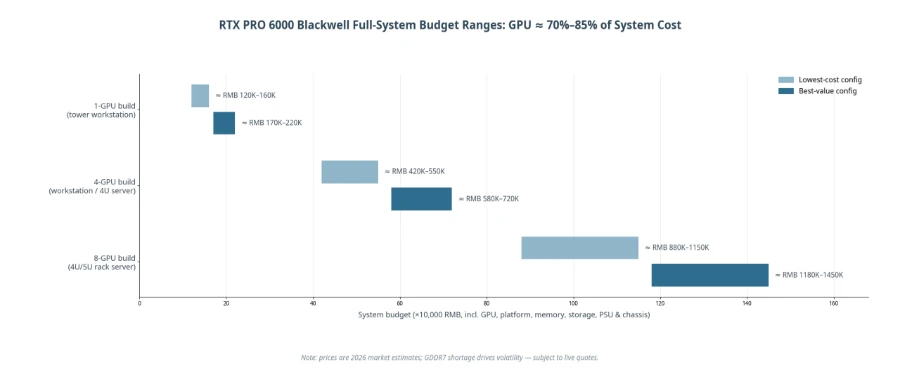
Figure 2 — Budget reference ranges for the three build tiers (2026 market estimates; the GPU accounts for roughly 70%–85% of total system cost)
5.1 1-GPU Build (Tower Workstation, approx. RMB 120,000–220,000)
Component | Lowest-Cost Configuration | Best-Value Configuration |
GPU | RTX PRO 6000 Workstation Edition ×1 | Max-Q ×1 (leaving room for 4-GPU expansion) or Workstation Edition ×1 |
CPU | AMD Ryzen 9 9950X (16 cores) | Threadripper 7970X / Xeon W-2500 series |
Memory | 64GB DDR5 | 128GB–256GB DDR5 ECC |
Storage | 2TB NVMe SSD | 4TB NVMe (OS/data separation, RAID-capable) |
PSU / Chassis | 1200W Gold + air-cooled tower | 1600W Platinum + full tower (room for multi-GPU) |
System Budget | Approx. RMB 120,000–160,000 | Approx. RMB 170,000–220,000 |
Suitable for: individual AI developers, industrial design, 8K video and rendering studios. If you know you will expand to 2–4 GPUs within two years, go straight to the Max-Q platform to avoid swapping cards later.
5.2 4-GPU Build (High-Density Workstation / 4U Server, approx. RMB 420,000–720,000)
Component | Lowest-Cost Configuration | Best-Value Configuration |
GPU | Max-Q Workstation Edition ×4 (384GB total VRAM) | Server Edition ×4 (4U rack, 7×24 operation) |
CPU | Single-socket AMD EPYC 9554 (64 cores) | Dual-socket EPYC 9005 series / Xeon 6 |
Memory | 256GB DDR5 | 512GB DDR5 ECC RDIMM |
Storage | 2×4TB NVMe | 4×4TB enterprise NVMe (RAID10) + OS drive |
PSU / Chassis | 4U chassis + 2000W×2 | 4U GPU server chassis + 2700W redundant PSUs |
System Budget | Approx. RMB 420,000–550,000 | Approx. RMB 580,000–720,000 |
Suitable for: LLM fine-tuning and inference for small and mid-size teams, batch render farms, multi-user shared compute. Choose Max-Q for office environments and the Server Edition for server rooms.
5.3 8-GPU Build (4U/5U Rack Server, approx. RMB 880,000–1,450,000)
Component | Lowest-Cost Configuration | Best-Value Configuration |
GPU | Server Edition ×8 (768GB total VRAM) | Server Edition ×8 |
CPU | Dual-socket EPYC 9554 | Dual-socket EPYC 9755 (128 cores ×2) |
Memory | 768GB DDR5 | 1TB–1.5TB DDR5 ECC RDIMM |
Storage | 8×4TB NVMe | 8×8TB enterprise NVMe + hot spare |
Networking | 100GbE | 200G/400G InfiniBand or RoCE (CX-7) |
PSU / Chassis | 4U/5U + 3000W redundant | GPU-optimized chassis + N+N redundancy + rack PDUs |
System Budget | Approx. RMB 880,000–1,150,000 | Approx. RMB 1,180,000–1,450,000 |
Suitable for: enterprise inference clusters, large-model fine-tuning platforms, university computing centers. 8-GPU builds must use the Server Edition, and the server room must provide ≥6kW per rack plus matching cooling capacity.
Budget note: across all three tiers, the GPU accounts for 70%–85% of total system cost. Affected by tight GDDR7 memory supply, global RTX PRO 6000 Blackwell pricing has fluctuated markedly since launch (the official store reference price has risen to about US$16,000 per card) — please base system quotes on the day of inquiry.
6. Procurement Pitfalls and FAQ
Q1: Is the memory the same across all three versions?
Exactly the same: 96GB GDDR7 ECC with a 512-bit bus. Don't agonize over memory when choosing — only power, cooling, and deployment form matter.
Q2: Can I mix Max-Q and Server Edition cards?
Not recommended. The two have different cooling designs (active rear-exhaust vs. passive); mixing them disrupts airflow and triggers thermal throttling. Keep to one version per machine.
Q3: Can the Server Edition be installed in a regular tower workstation?
No. The Server Edition is passively cooled with no fans and depends on the forced airflow of a server chassis; in a regular case it will hit thermal protection within minutes.
Q4: What size model can 96GB of VRAM run?
A single card smoothly runs 70B-class quantized (Q4) inference or 32B-class high-precision inference; 4 cards (384GB) can fine-tune 70B-class models; 8 cards (768GB) can support inference serving for around a hundred concurrent users.
Q5: How are prices right now?
The RTX PRO 6000 Blackwell launched in March 2025 at an official price of US 8,565; affected by the GDDR7 shortage, the official store reference price has risen to about US 16,000 in 2026, and domestic channel prices fluctuate considerably with the market. Volume purchases (4-GPU / 8-GPU complete systems) usually secure better overall quotes — inquire on a full-system basis rather than stacking single-card prices.
Q6: Certified turnkey systems vs. self-built from loose cards — what's the difference?
There is a difference. Certified systems undergo system-level thermal, power, and compatibility validation and carry a whole-system warranty; self-built rigs in multi-GPU scenarios are prone to power delivery, cooling, and driver compatibility problems. For 4 GPUs and above, a vendor turnkey system is strongly recommended.
7. About ChangFan Industrial Computing
ChangFan Industrial Computing (Guangzhou ChangFan Intelligent Technology Co., Ltd. — ChangFan, official site cfitsi.com) is a professional manufacturer of industrial computers and AI compute equipment, specializing in industrial PCs, GPU workstations, AI servers, mini PCs, and network security appliances, with products sold to overseas markets worldwide.
• All versions in stock: RTX PRO 6000 Blackwell Workstation Edition / Max-Q / Server Edition — single cards and complete systems supplied in parallel;
• Custom-built systems: 1-GPU towers, 2–4-GPU high-density workstations, and 4–8-GPU rack servers configured on demand, with 48-hour burn-in testing before shipment;
• Global delivery: multilingual technical support, worldwide logistics, and international trade terms (FOB/CIF/DDP), backed by a three-year warranty;
• Solution consulting: free configuration assessment — tell us your model size, concurrency, and budget, and our engineers will deliver a configuration list within 24 hours.
For an RTX PRO 6000 Blackwell system quote or the technical white paper, visit cfitsi.com or contact a ChangFan Industrial Computing sales engineer.
7. About ChangFan Industrial Computing
ChangFan Industrial Computing (Guangzhou ChangFan Intelligent Technology Co., Ltd. — ChangFan, official site cfitsi.com) is a professional manufacturer of industrial computers and AI compute equipment, specializing in industrial PCs, GPU workstations, AI servers, mini PCs, and network security appliances, with products sold to overseas markets worldwide.
• All versions in stock: RTX PRO 6000 Blackwell Workstation Edition / Max-Q / Server Edition — single cards and complete systems supplied in parallel;
• Custom-built systems: 1-GPU towers, 2–4-GPU high-density workstations, and 4–8-GPU rack servers configured on demand, with 48-hour burn-in testing before shipment;
• Global delivery: multilingual technical support, worldwide logistics, and international trade terms (FOB/CIF/DDP), backed by a three-year warranty;
• Solution consulting: free configuration assessment — tell us your model size, concurrency, and budget, and our engineers will deliver a configuration list within 24 hours.
For an RTX PRO 6000 Blackwell system quote or the technical white paper, visit cfitsi.com or contact a ChangFan Industrial Computing sales engineer.
