
How to Choose a GPU Server for LLM Inference in 2026: VRAM, Topology, and Cooling
Introduction: Inference Is Where the AI Bill Actually Lands
In 2026 the AI conversation has shifted from training to inference. Training a frontier model is a one-off capital event; serving it to users is a permanent operating cost. Industry estimates put AI server spending on a steep curve, and the share of compute devoted to inference rather than training is now the majority of deployed GPU hours. For most companies the practical question is no longer 'which GPU is fastest' but 'which GPU server keeps cost-per-million-tokens low at my concurrency, model size, and rack power budget.' This guide answers that with numbers.
What Does LLM Inference Actually Consume?
Quick answer: inference is memory-bandwidth-bound, not compute-bound. Generating each token means streaming the model weights and the KV cache through the GPU, so tokens per second scale with memory bandwidth and batch size far more than with raw TFLOPS.
Two phases matter. Prefill processes the whole prompt in parallel and is compute-heavy; decode generates output token by token and is memory-bandwidth-heavy. Long prompts and long outputs therefore stress different resources. That is why a card with huge TFLOPS but small VRAM and narrow bandwidth can lose to a 'slower' card with more memory bandwidth on real chat workloads. When sizing a server, watch VRAM capacity, VRAM bandwidth, and NVLink/PCIe topology together, not the spec-sheet peak FLOPS alone.
How Much VRAM Do You Need for 7B, 13B, 70B, and 180B Models?
Quick answer: budget roughly 2 bytes per parameter at FP16, 1 byte at INT8, and 0.5 byte at INT4, then add 15-30% for the KV cache and runtime overhead. A single 70B model at INT8 needs about 80-100 GB before batching, which means at least 2x48GB or 4x24GB cards.
The KV cache is the hidden cost. It grows with context length x concurrent sequences x layers, so a server that fits a model at 4K context can run out of memory at 32K or at high concurrency. Plan VRAM for the p95 context length and target concurrency, not the demo prompt. As a rule of thumb, inference-optimized deployments leave 20-30% VRAM headroom so the scheduler can batch aggressively without out-of-memory restarts.
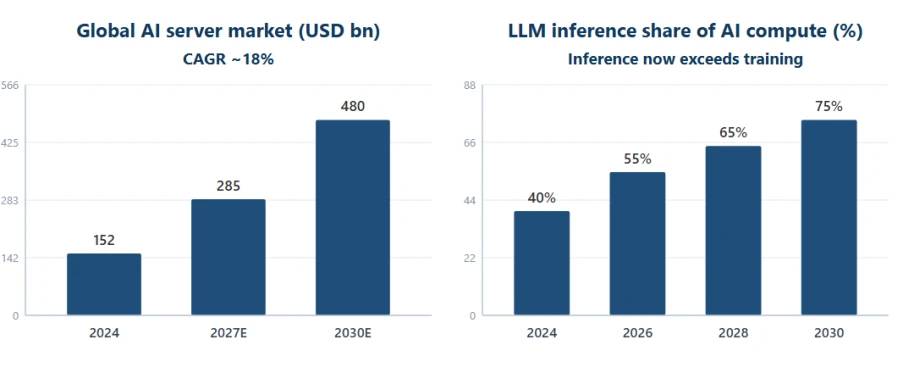
Figure 1: AI server market size and the rising share of LLM inference (data sources in the appendix)
4U Multi-GPU or 8-GPU Chassis? Topology, Cooling, and Expansion
Quick answer: one 4U server with 4-5 dual-width GPUs is the sweet spot for most private LLM deployments; move to an 8-GPU NVLink platform only when one model must span more than four GPUs or you need maximum per-node throughput.
Topology decides whether multi-GPU inference scales. PCIe-only fan-out is fine for small models and data-parallel serving, but tensor-parallel serving of a 70B+ model needs high-bandwidth GPU-to-GPU links (NVLink/NVSwitch), or the interconnect becomes the bottleneck. Thermals decide whether it survives: four or five 350-700W dual-width cards in 4U require a dedicated rear GPU fan module and front-to-back airflow. Plan 3+1 or 2+2 redundant power supplies and confirm the rack can deliver the amps.
▪ Single GPU: best for 7B-13B prototypes and low-concurrency internal tools.
▪ 2-4 GPUs in one 4U: best balance of capacity, redundancy, and power for 32B-70B models.
▪ 8-GPU NVLink node: for 70B+ tensor-parallel serving, multi-tenant APIs, or agent fleets.
▪ Always verify PCIe lane allocation and rear fan clearance before you buy.
LLM Inference Scenarios vs. GPU Server Configuration (2026)
The table below maps typical inference workloads to a starting hardware envelope. Treat it as a sizing baseline, then refine by measured tokens per second on your own prompt mix.
Scenario | Model & concurrency | GPU configuration | VRAM target | Recommended platform |
Prototype / single developer | 7B-13B, 1-3 users | 1x dual-width GPU | 24-48 GB | 1U/2U GPU workstation |
Team inference | 7B-32B, 5-20 users | 1-2x dual-width GPU | 48-96 GB | 2U GPU server |
Department LLM | 70B (INT8), 20-50 users | 2-4x GPU | 96-160 GB | 4U 4-GPU server |
Enterprise serving | 70B-180B, 50-200 users | 4-8x GPU + NVLink | 160-640 GB | 4U/8-GPU NVLink node |
Multi-tenant / agents | Any, 200+ users | 8x data-center GPU | 640 GB+ | 8-GPU HGX / cluster |
Table 1: LLM inference workloads vs. GPU server configurations (2026)
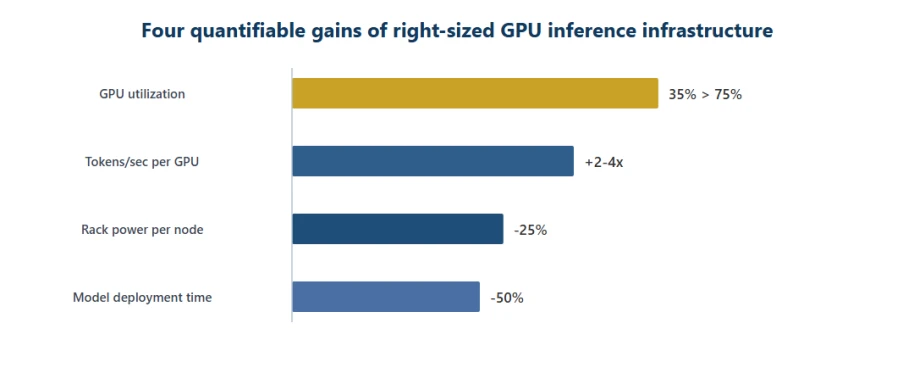
Figure 2: Four quantifiable gains of right-sized GPU inference infrastructure (illustrative, data sources in the appendix)
Power, Cooling, and the Room You Forgot to Budget
Quick answer: dense GPU servers turn a rack into a space heater. A 4U node with four 600W GPUs plus CPUs and fans can draw 3-4 kW; eight-GPU nodes push past 8-10 kW. Confirm your PDU, circuit, and cooling can handle it before the hardware arrives.
Airflow direction, hot-aisle containment, and ambient temperature all affect whether GPUs throttle under sustained inference load. If your facility cannot support high-density racks, a 4U/4-GPU node at moderate power is often more reliable than a theoretical 8-GPU monster that thermally throttles. Noise is the other forgotten constraint: rear GPU fan modules are loud, so plan placement away from people.
ChangFan GPU Servers: A Whole-System Platform Built for AI Inference
Industrial AI is 70% workload and 30% hardware, but the wrong 30% can erase the 70%. Guangzhou ChangFan Intelligent Technology Co., Ltd. (ChangFan) builds rackmount GPU servers engineered for sustained inference: 4U platforms supporting up to 5 dual-width GPUs on dual Intel Xeon Scalable (1st-5th Gen) with up to 4TB DDR4/DDR5 ECC memory, single-socket AMD EPYC 7002/7003/8004 variants with 4 dual-width GPUs, and 24-bay chassis with optional NVMe for model storage. Every unit ships with a dedicated rear GPU fan module, 1+1 or 2+2 redundant power, onboard Gigabit networking, PCIe expansion, and IPMI remote management.
If you are evaluating a private LLM, an inference API, or an agent fleet, contact ChangFan for a whole-system configuration recommendation sized by model size x concurrency x rack power (hardware only, no software subscription). OEM/ODM customization is supported for integrators and brands.
Frequently Asked Questions (FAQ)
Q1: How many GPUs does a 7B model need for inference?
A: A single 24GB card runs a 7B model at INT8; for FP16 and moderate concurrency, one 48GB card or two 24GB cards give comfortable headroom. VRAM, not FLOPS, is the first constraint.
Q2: Should I use consumer RTX cards or data-center GPUs for inference?
A: Consumer cards win on price per GB for prototypes and low-concurrency internal tools; data-center GPUs win on memory bandwidth, NVLink, ECC, and 24/7 reliability. Choose by SLA and concurrency, not by peak FLOPS.
Q3: Is a 4U 4-GPU server enough for a 70B model?
A: For INT8 serving at moderate concurrency, yes: 4x48GB (192GB) comfortably holds a 70B INT8 model plus KV cache. For FP16, high concurrency, or 180B models, move to an 8-GPU NVLink node.
Q4: Does more VRAM always mean faster inference?
A: No. Tokens per second depends on memory bandwidth, batch size, and interconnect. Extra capacity prevents OOM and enables larger batches, but bandwidth and topology decide throughput.
Q5: Can I add GPUs to a standard 2U server later?
A: Usually not safely: standard servers lack GPU power cabling, rear fan modules, and PCIe lane allocation for dual-width cards. Buy a chassis designed for GPUs from day one.
- Previous article 2026 Edge AI Scale-Up: From Orin to Thor, How Changfan Secures the Computing Foundation for "Physical AI"
- Next article there is none left
