
How Many Cores Do You Really Need? A Buyer's Guide to PC & Server CPUs
Bottom line: The most common mistake when buying a CPU is assuming the bigger number wins. Core count decides parallel capacity, clock speed decides single-task speed, and thread count is the marketing amplifier of the two. This article breaks the three parameters down from the workload side, so the budget goes where it actually pays.
1. What Does Each Parameter Actually Control?
Parameter | What it decides | Common misconception |
Core count | How many tasks can run at once (parallel throughput) | More cores does not mean each task is faster |
Thread count | Resource reuse from hyper-threading / SMT | A thread is not a physical core; the gain is usually 20%~30% |
Clock speed | Single-core execution speed and response latency | High clock with few cores suits gaming, not a render farm |
Cache | Data hit rate; matters for latency-sensitive loads | Large-cache parts carry a premium — buy to need |
TDP | Cooling and power-delivery cost | At the same TDP, architectures can differ by 40% in performance |
Table 1 | What the five parameters really control
2. Matching the Workload
Workload | Key parameter | Reference configuration |
Gaming, real-time trading | Clock > cache > cores | 6~8 cores at 5 GHz+ |
Office, web services | Balance of cores and efficiency | 8~16 cores |
Video rendering, compilation | Core count first | 24~64 cores |
Virtualisation, container cloud | Cores + memory channels | 32~96 cores with 8 channels |
AI inference (GPU-led) | PCIe lanes + single-core speed | 16~32 high-clock cores is enough |
Databases | Memory channels + clock | High clock with 8-channel ECC |
Table 2 | Workload-to-parameter mapping with reference configurations
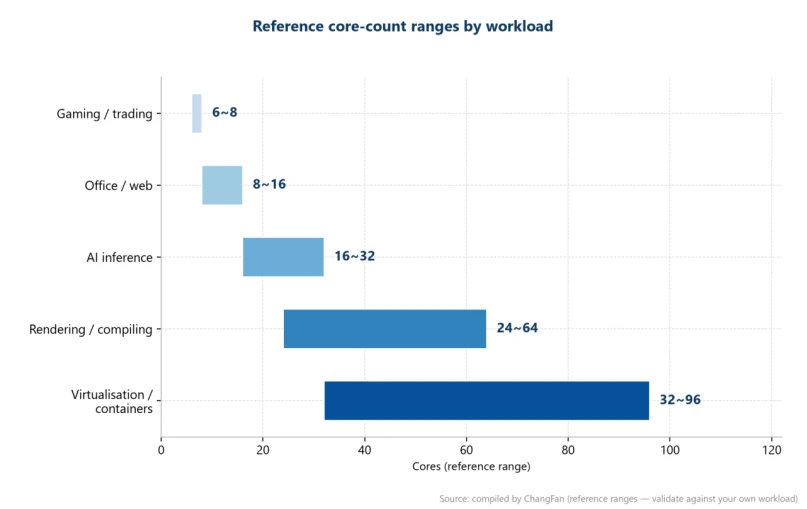
Figure 1 | Reference core-count ranges by workload type (drawn from the table above)
3. A Practical Formula
Required cores ≈ concurrent tasks × cores per task × 1.3 (headroom)
Example: 8 virtual machines × 4 cores × 1.3 ≈ 42 cores, so a 48-core platform fits. If the workload is mostly single-threaded — CAD modelling, for instance — prefer a high-clock, lower-core model and you can save around 30% of the budget.
Before delivery, ChangFan runs a workload profile assessment and recommends a CPU tier from the customer's real concurrency and software stack, so you never pay for cores that never get used.
4. Frequently Asked Questions
Q: Should hyper-threading be switched on?
Answer: For most server and rendering workloads, yes — it is 20%~30% extra throughput for free. For real-time systems that are extremely latency-sensitive, switching it off buys you determinism instead.
Q: If I double the core count, do I double the performance?
Answer: No. Parallel efficiency is limited by software scheduling, memory bandwidth and I/O; the real gain is usually 1.6~1.8×, because Amdahl's law leaves a serial part that never goes away.
Q: Can I trust the 5.8 GHz printed on a laptop CPU?
Answer: That is a short single-core boost peak. The sustained all-core frequency is often 20%~40% lower. For sustained performance, check the all-core frequency and the measured power budget instead.
Q: At the same core count, how much does a newer architecture gain?
Answer: At equal core count, IPC (instructions per clock) on a new generation is typically 10%~20% higher; with frequency and process improvements combined, a full generation can deliver more than 30%.
About ChangFan
ChangFan (cfitsi.com) is a manufacturer of industrial computers and AI computing equipment. Its range covers GPU servers, industrial PCs, mini PCs, touch all-in-one panels and network communication devices, with OEM/ODM customization, a three-year warranty and global delivery. For products and full-system quotations, visit cfitsi.com or contact a ChangFan sales engineer.
Product Link:https://www.cfitsi.com/shang-jia-shi-fu-wu-qi
