
NVR Storage Calculator: How Much Storage Do 100 Cameras Actually Need?
Video Surveillance Storage Design: From Camera Count, Bitrate and Retention to Real Capacity (2026)
Bottom line: The easiest mistake in surveillance storage is estimating with "camera count × drive size". The real formula has four variables: camera count, bitrate, retention days, and the overhead factor everyone forgets. Miss one and you will breach your retention commitment. Get the capacity right first; then talk about media and architecture.
1. Why Video Loads Are Nothing Like Ordinary File Loads
Design surveillance storage like a general file server and it will misbehave, because the load profile is completely different. Writes come as large sequential blocks, around the clock. The streams are already encoded, so there is almost nothing left to compress. Writes far exceed reads — until playback and retrieval begin, when several clients read randomly at once. Expired footage is recycled in whole segments, creating constant overwrite pressure. The consequences: size capacity by write volume, not by file count; choose media by sustained write capability, not peak bandwidth; and verify random-read performance under concurrent playback separately — otherwise you can record everything and retrieve nothing.
2. The Capacity Formula: Four Variables and a Worked Example
Daily capacity (TB) ≈ camera count × bitrate (Mbps) × 0.0103
Total capacity ≈ daily capacity × retention days × overhead factor (plan 1.15~1.3). The overhead factor covers three things: the redundancy of RAID or erasure coding, file-system and alignment losses, and bitrate fluctuation — real bitrates often rise when the scene changes, even with smart encoding. Ignoring it is the most common cause of missing a retention commitment.
Scale | Cameras | Bitrate | Raw daily capacity | 30-day capacity | 90-day capacity |
Small site | 32 cameras | 4 Mbps | about 1.32 TB/day | about 40 TB | about 119 TB |
Mid-size campus | 64 cameras | 6 Mbps | about 3.96 TB/day | about 119 TB | about 356 TB |
Large campus | 128 cameras | 8 Mbps | about 10.55 TB/day | about 316 TB | about 949 TB |
Table 1 | Daily and cumulative capacity by scale (overhead factor not included)
The figures above are raw — multiply by 1.15~1.3 for procurement. Notice the pattern: retention days scale capacity linearly, while camera count and bitrate multiply together. Dropping the bitrate from 6 Mbps to 4 Mbps saves a third of the capacity outright, which is often worth more than a better drive.
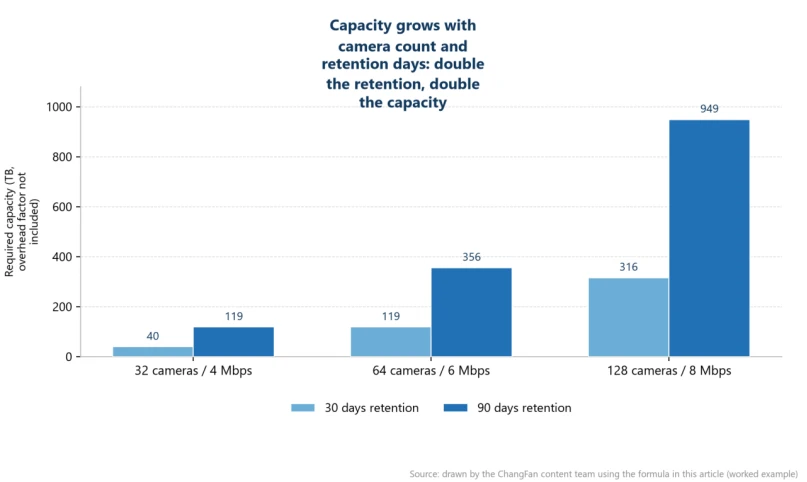
Figure 1 | Capacity growth with camera count and retention days (drawn from the table above)
3. Media: Surveillance HDD, Enterprise SSD and Desktop Drives
Dimension | Surveillance HDD | Enterprise SSD | Desktop drive |
Sustained writes | Optimised for 7×24 sequential writing | Strongest, but TBW must be budgeted | Not suitable for continuous writing |
Annualised workload | High, designed for surveillance duty | Depends on the drive rating | Low |
Playback reads | Slower, multi-stream playback bottlenecks | Fast, suits frequent retrieval | Slow |
Cost per TB | Low | High | Lowest |
Best position | Central high-capacity retention | Hot data, index and cache tier | Not recommended for production |
The conclusion is direct: use surveillance-grade HDD for high-capacity retention and enterprise SSD for hot data and retrieval. Desktop drives fail at a notably higher annual rate under 7×24 writing — the money saved usually comes back as lost footage and operations hours.
4. Architecture: Centralised, Edge-Local and Tiered Archival
All three approaches have their place. Centralised storage suits a single campus with multiple buildings: capacity is pooled and management is simple, but it leans heavily on upstream bandwidth. Edge-local retention records at the site first and sends only key clips or structured results to the centre, which cuts upstream pressure sharply and fits keep-data-local requirements. Tiering and archival keep recent footage on the performance tier and move anything older automatically to a low-cost tier or object storage, balancing retrieval speed against long-term retention cost. The realistic answer for mid-size and larger projects is all three: record at the edge, aggregate centrally, archive the cold.
5. Bandwidth and Concurrency: Do Not Size for Writes Alone
What designs most often miss is read pressure. Multi-stream concurrent playback turns into random reads, where mechanical drives degrade visibly; meanwhile retrieval, AI analysis and exports compete with writes for the same bandwidth. Plan the network as write bandwidth + peak playback bandwidth + margin, and validate with the real number of concurrent clients at selection time — not with a single-stream test.
6. Edge Pre-Processing: Reducing Upstream and Capacity Together
Doing frame extraction, structuring and event detection at the site — and sending back only key frames, structured results and alarm clips — reduces upstream bandwidth and central capacity at the same time. It is the highest-leverage step in a surveillance project: what it saves is not the price per terabyte but the amount of data you need to keep at all. It also gives the edge site store-and-forward capability during outages.
7. Frequently Asked Questions
Q: How much capacity do 100 cameras actually need?
Answer: Work the formula. At 6 Mbps and 30 days retention: 100 × 6 × 0.0103 ≈ 6.2 TB per day, about 185 TB for 30 days, then multiply by the 1.15~1.3 overhead factor — plan for roughly 215~240 TB.
Q: What is the difference between a surveillance drive and a normal drive?
Answer: Three things: firmware tuned for many concurrent continuous streams (fewer stalls and dropped frames), a higher rated annualised workload, and validation for 7×24 operation. Desktop drives are designed for intermittent duty, so neither stability nor lifespan matches continuous writing.
Q: Can SSDs be used for surveillance storage?
Answer: Yes, but the write endurance has to be budgeted. For bulk retention, SSD cost per TB is clearly higher — the sensible pattern is a small amount of SSD for index, cache and frequent retrieval, with surveillance HDD for the capacity tier.
Q: How much capacity does H.265 save?
Answer: At equal quality, typically 30–50% less than H.264, depending on scene complexity and encoder settings. Note that decoding also demands more compute, so playback and analysis hardware need to be evaluated together.
Q: Does 90-day retention require distributed storage?
Answer: Not necessarily — but once total capacity reaches the hundreds of terabytes, the expansion elasticity and fault tolerance of distributed storage become clear advantages. The trigger is total volume and growth curve, not the retention number itself.
Q: Can video footage go straight into object storage?
Answer: Yes, especially for long-term archival. Footage is naturally write-once, read-rarely and never rewritten — a perfect object. Just remember retrieval is object-based: if you need second-level locate-and-play, keep a performance tier as well.
8. Deliverable Forms and Customisation
ChangFan (cfitsi.com) provides storage hardware for surveillance and edge retention: multi-bay retention servers supporting large-capacity surveillance HDD with SSD tiering, and edge compact storage nodes with wide temperature, fanless operation, vibration resistance and power-loss protection for site-level local retention and pre-processing — with OEM/ODM customization, a three-year warranty and global delivery (FOB/CIF/DDP).
Product link:https://www.cfitsi.com/shang-jia-shi-fu-wu-qi
- Previous article How Many Cores Do You Really Need? A Buyer's Guide to PC & Server CPUs
- Next article there is none left
