
CPU Buying Guide 2026: Five Tiers from Office to AI Training
CPU Selection List 2026: Five Tiers from Office to AI Training
One shortlist that settles the CPU decision for 90% of buying scenarios
ChangFan (cfitsi.com) · Hardware Selection Knowledge Base
Bottom line: If you would rather not study architectures and code names and only want to know which CPU to buy at this budget, this is the article for you. We split CPUs into five tiers by budget and workload, and for every tier we give both a desktop direction and a server direction.
1. The Five-Tier Shortlist
Tier | Typical scenario | Desktop platform | Server platform |
Entry | Office, POS, light applications | Core i3 / Ryzen 3 (4~6 cores) | Xeon E / EPYC 4004 series |
Mainstream | Design, development, small and mid-size business | Core i5~i7 / Ryzen 5~7 (8~16 cores) | Single-socket Xeon / EPYC 8004 (16~32 cores) |
High-end | 3D rendering, AI development, databases | Core i9 / Threadripper (24~32 cores) | Single-socket Xeon 6 / EPYC 9005 (48~64 cores) |
Flagship | Virtualisation clusters, LLM fine-tuning | Threadripper PRO / Xeon W (64 cores) | High-configuration single-socket EPYC 9005 (96~128 cores) |
Extreme | Cloud, HPC, AI training | — | Dual-socket EPYC / Xeon 6 (192~256 cores) |
Table 1 | The five-tier CPU shortlist, with a desktop and a server direction for each tier
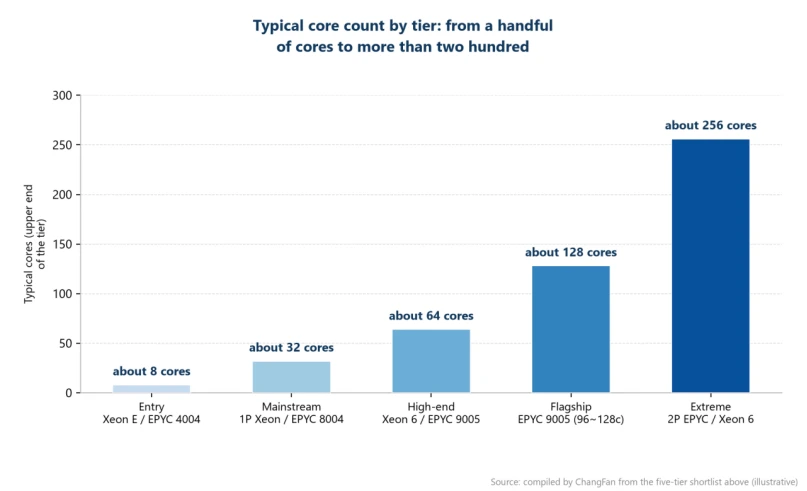
Figure 1 | Typical core count by tier (upper end of each tier)
2. Three Places Where Budgets Commonly Blow Out
First, paying for peak load: for most businesses the peak is only about 5% of running time, so size on the average plus 30% headroom. Second, ignoring software licensing: some databases and middleware are licensed per core, so doubling cores can double the licence bill. Third, overlooking platform lifecycle: a server platform runs 5~7 years, and end-of-life boards and CPUs often drop more than 30% in price — that is the window to buy well.
ChangFan (cfitsi.com) supplies complete machines and custom builds across all five CPU tiers, and offers a free configuration assessment before you order, so every unit of budget maps to measured throughput.
3. Frequently Asked Questions
Q: For a small company, is an entry-tier server or a high-end PC the better buy?
Answer: If you need 7×24 operation, ECC memory and remote management, choose an entry server. If the machine only works through the business day, a high-end PC gives better value.
Q: For AI training, should the money go into the CPU or the GPU?
Answer: The GPU — it carries 70%~85% of the spend. The CPU only has to stay out of the way: 16~32 cores with enough PCIe lanes. Blindly stacking CPU cores is one of the most common forms of waste.
Q: Are second-hand server CPUs worth buying?
Answer: Retired cloud CPUs (EPYC 7002/7003, for example) can be excellent value, but confirm board power delivery, BIOS version and warranty channel first. A refurbished system from a manufacturer is safer than assembling loose parts.
Q: How do I verify the selection was right?
Answer: Measure for seven days: log average and peak CPU utilisation, memory usage and I/O wait. If average utilisation stays below 30%, you can move down a tier; if it runs above 70%, it is time to move up.
Product Link:https://www.cfitsi.com/shang-jia-shi-fu-wu-qi
- Previous article How to Choose a GPU Server for LLM Inference in 2026: VRAM, Topology, and Cooling
- Next article there is none left
